


SI Tickets
3.327.00 Reviews
App Specs
- Version
- 4.05
- Updated On
- License
- Free
- Downloads
- 50,000+
- Developer
- SI Tickets by Sports Illustrated
- Categories
- Events
- Platform
- Android
Screenshots

 Analysis by AppCompare
When I’m choosing an event-ticket app, I care less about a long feature list than about whether it helps me find a suitable event, compare options, and make a purchase without turning a fun plan into a chore. SI Tickets is aimed at that practical moment: it brings live-event discovery and ticket buying together in one place. I’d consider it when I’m open to browsing, but I’d still compare options before committing, especially if a particular venue or event has an official ticketing channel I already trust.
Start with the kind of ticket search you actually need
The first useful question is whether you’re searching for a specific event or simply looking for something to do. If you know the artist, team, or performance, a direct search can keep the process focused. If your plans are flexible, browsing categories and narrowing by date, location, or price can make discovery feel more manageable. Those filters are most useful when treated as a shortlist tool: they help me find plausible options, but I’d still check the event details and seat choice carefully before buying.
That distinction matters because a ticket marketplace is not always the best starting point. For a one-off event I’ve already chosen, the venue or organizer’s own sales route may be more direct. For a free evening with no fixed plan, an event app can be more useful because it encourages discovery rather than asking me to arrive with a destination in mind. I see this app as better suited to the second kind of browsing than as a reason to abandon every other ticket source.
Where it can make event planning easier
SI Tickets is an Events app from SI Tickets by Sports Illustrated. It is free, has an Everyone age rating, and has been downloaded over ten thousand times. Its average rating is 3.4 from around a hundred ratings, so I’d treat it as a service worth assessing for my own needs rather than assuming every user has had the same experience. The app’s current version is 4.03, and its release date was June 7, 2021.
For a realistic use case, imagine I have a free Saturday but no plan. I can browse events, use location and date to reduce the list, and compare the options that fit my evening. If I spot a show I hadn’t considered, recommendations may help me continue exploring; if I already know what I want, search is the more efficient route. Either way, I’d make the final decision based on the event, the available seats, and the total purchase details rather than on a recommendation tile alone.
One less obvious planning habit is to use filters in stages instead of trying to define the perfect search at the outset. I’d first narrow by date and area, then adjust the price range and compare a small group of results. This avoids filtering away an appealing event just because my initial assumptions were too strict. It also makes the app’s discovery side more valuable: an unexpected option can be worth considering when the timing and location already work.
When another route may be a better fit
People often use three kinds of alternatives: an event organizer or venue’s own ticket page, a broad ticket marketplace, or a general search that sends them to several sellers. The official route can be preferable when I want the organizer’s direct information or already know where tickets are being sold. A broader marketplace may suit someone comparing a larger range of listings, while general search can help check whether an event appears through different channels. I wouldn’t assume any one route is automatically cheaper or safer; I’d compare the exact event, seat, and checkout terms.
Worth Reading Before You Choose

EA SPORTS FC Mobile 26 Is a Bigger Football Game, but It Takes Time

Flipboard Shows What News Apps Must Do Beyond the Feed

Switching to Android Auto Means Rethinking Your Driving Routine

Google Calendar Makes a Crowded Week Easier to Manage

Ludo King Makes the Most of the Minutes Between Plans

Baby Panda World Brings Quick Play to Modern Phones, but Its Game Library Feels Busy
SI Tickets makes more sense when I want discovery and purchasing in the same app, especially across sports, concerts, and theater. It may be less compelling if I only attend events from one venue and already use that venue’s own system, or if my main goal is to compare many sellers side by side. The sensible approach is to search here, then pause before checkout if the event is important or the seating choices are unfamiliar. A few minutes of comparison can prevent a rushed decision.
Make the purchase decision deliberately
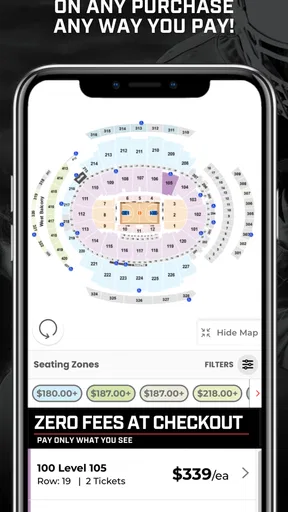
Interactive seating is useful because it can help me choose a location rather than simply accept an unspecified seat. Still, a seat map is only one part of the decision. I’d check the section and position shown, consider whether the view suits the event, and review the order summary before paying. Seat selection can make the process feel reassuring, but it does not remove the need to read each choice carefully.
For a group, I’d agree on a budget and preferred seating area before opening the checkout flow. That small step reduces back-and-forth while seats are being considered and helps avoid choosing different areas by mistake. If I’m buying alone, I can be more flexible: I’d compare a couple of suitable sections rather than fixating on one seat. The trade-off is straightforward—more choice can improve the fit, but it can also make browsing slower if I don’t set a limit.
Before relying on any ticket app for a time-sensitive plan, I’d also make sure I can access my account and the purchase details I need. I would not leave the first sign-in or account check until I’m already heading to the event. That is ordinary preparation, but it matters more when a ticket is tied to a specific date and there is little room to sort out a last-minute login problem.
What to expect from the extras
Recommendations and alerts are most useful when I treat them as prompts, not as a complete event-planning system. A recommendation can surface an option I might otherwise miss, while an alert for a favorite artist or team can save me from repeatedly checking for news. I’d still keep an eye on the event details myself, because alerts are only helpful if the interests I set match what I genuinely want to follow.
Adding an event to a calendar can help coordinate plans, particularly when several people are involved. I’d use it after checking the event date and time, then share the plan with the group through whatever method we already use. Calendar reminders reduce the chance of forgetting an event, but they do not replace checking travel arrangements or confirming everyone has their own ticket.
The option to sell tickets through the platform may be useful if plans change, but I’d regard it as a possible fallback rather than a guarantee that I can recover the cost. Before buying, I’d consider how firm my plans are and read the terms attached to the specific purchase. If I know my schedule is uncertain, that should influence my decision before checkout, not only after I need to resell.
Switching from another ticket routine
Trying a new ticket app has a small but real cost: I need to learn where its event details and purchase steps are, and I may have to repeat searches I already know how to do elsewhere. I’d test it on a low-pressure search first—browse an event I’m considering, compare a couple of listings, and see whether the layout makes the information easy to evaluate. That gives me a feel for the workflow without making the app my only option for an important purchase.
If I already keep event plans in a venue app or use a familiar seller, I wouldn’t move everything over just for novelty. I’d use SI Tickets when its event discovery or seat-selection process suits the occasion, and keep the established route for events where it gives me clearer information. That mixed approach is more practical than treating a ticket app as an all-or-nothing choice.
The developer is SI Tickets by Sports Illustrated, and the app’s straightforward focus is live-event ticketing. I’d be comfortable recommending a trial to someone who likes browsing sports, concerts, and theater in one place, but I’d advise a careful checkout comparison to anyone who prioritizes a specific seller or needs to inspect every detail before purchasing.
If you’re like me and love catching the latest concerts, games, or theater performances, you know the struggle of scoring the best tickets hassle-free. Enter SI Tickets, an app that promises to make your ticket-buying experience as smooth as possible. I’ve taken it for a spin, and here’s how it fared.
Initial Impressions and User Interface
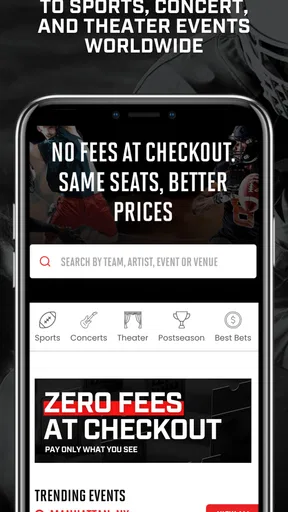
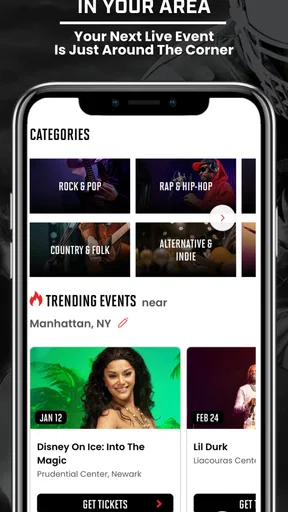
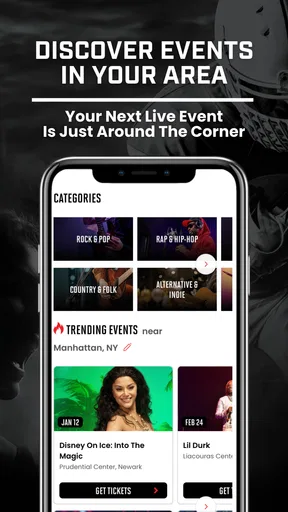
First things first, downloading and installing SI Tickets was a breeze. Available on both Android and iOS, it’s pretty lightweight, so it won’t hog your phone’s memory. The app opens up to a clean and straightforward interface. No fancy frills, just a clear path to what you need. I was immediately greeted by the home screen, which showcases popular events and categories to explore. It’s intuitive enough that even if you’re not tech-savvy, you can find your way around without a hitch.
Exploring Events
What really caught my eye is how neatly SI Tickets categorizes events. Whether you’re a sports fanatic, a concert-goer, or a theater enthusiast, you’ll find it all. The search functionality is pretty robust too. You can filter by date, location, and even price range. I found myself browsing through events I didn’t even know I wanted to attend until I saw them on the app!
Another cool feature is the “Recommended for You” section. Based on your browsing history and preferences, the app suggests events you might enjoy. It’s like having a personal event planner right in your pocket.
Purchasing Tickets
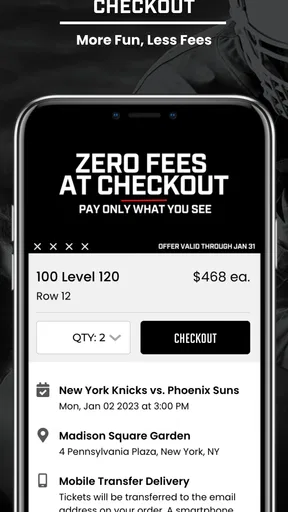
Now, let’s talk about the buying process, which is often where apps can stumble. With SI Tickets, it’s refreshingly straightforward. Once you find an event, selecting your seats is as easy as pie. The seating chart is interactive, letting you pick exactly where you want to sit. No more guessing or hoping for the best!
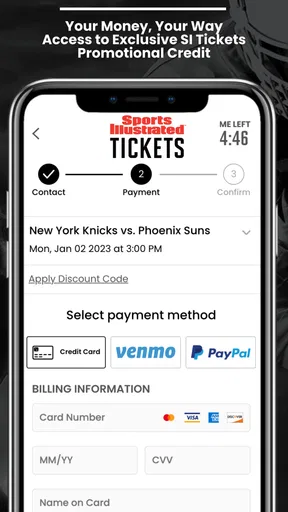
Payment is seamless with multiple options including credit cards, PayPal, and even some digital wallets. Plus, it’s reassuring to see that the app uses secure encryption for transactions, so your personal info stays safe.
Extra Perks and Features
SI Tickets doesn’t stop at just selling you a ticket. They offer some neat extras that enhance your experience. For example, you can set alerts for your favorite artists or sports teams, ensuring you never miss when they’re in town.
There’s also a nifty option to add events directly to your calendar, so double-booking is a thing of the past. And if plans change, the app makes it easy to sell your tickets through their platform, taking the stress out of last-minute cancellations.
Customer Support
We’ve all been there—something goes wrong, and we need help fast. Thankfully, SI Tickets offers solid customer support. Their help center is easy to access from the app, and you can get in touch via chat, email, or phone. During my test, I reached out with a query and received a friendly response in no time.
Final Thoughts
Overall, SI Tickets delivers on its promise of a seamless ticket-buying experience. It’s user-friendly, packed with features, and makes attending events a joy rather than a chore. Whether you’re a die-hard sports fan or a casual concert attendee, this app is worth checking out.
So, next time you’re planning a night out, give SI Tickets a try. Who knows, it might just become your go-to app for all your ticket needs. Happy event-going!
Pros
- User-friendly interface makes browsing easy.
- Wide variety of events available for all tastes.
- Secure payment options ensure safe transactions.
- Real-time updates on ticket availability.
- Loyalty program offers rewards and discounts.
Cons
- Limited customer service hours for support.
- Occasional app crashes during peak times.
- High service fees on certain ticket purchases.
- No offline mode for viewing purchased tickets.
- Limited search filters for specific event types.
FAQs for SI Tickets
What is SI Tickets and how does it work?
SI Tickets is a mobile application that allows users to purchase tickets for various events such as concerts, sports, and theater performances. The app provides an easy-to-navigate interface where users can browse events, view seating charts, and secure tickets quickly. SI Tickets aims to offer a seamless ticket-buying experience with competitive pricing and reliable customer support.
Is SI Tickets available for both Android and iOS devices?
Yes, SI Tickets is available for download on both Android and iOS platforms. Users can find the app on the Google Play Store for Android devices and the Apple App Store for iOS devices. This ensures a wide range of users can access the app and take advantage of its features regardless of their device preference.
Are there any additional fees when purchasing tickets through SI Tickets?
While SI Tickets strives to provide competitive pricing, users should be aware that additional fees may apply to ticket purchases. These can include service fees and delivery charges, depending on the event and ticket type. It’s advisable to review the final price breakdown during checkout to understand all associated costs before completing a purchase.
How secure is the payment process on SI Tickets?
SI Tickets prioritizes user security and employs robust encryption methods to ensure all transactions are safe. The app supports various secure payment options, including credit/debit cards and digital wallets. Users can confidently make purchases knowing that their personal and financial information is protected against unauthorized access.
What is the refund policy for tickets purchased through SI Tickets?
The refund policy for SI Tickets varies depending on the event organizer's rules. Generally, tickets are non-refundable unless an event is canceled or rescheduled. It is important for users to review the specific terms and conditions of their ticket purchase. Customer support can assist with any issues or queries regarding refunds.


